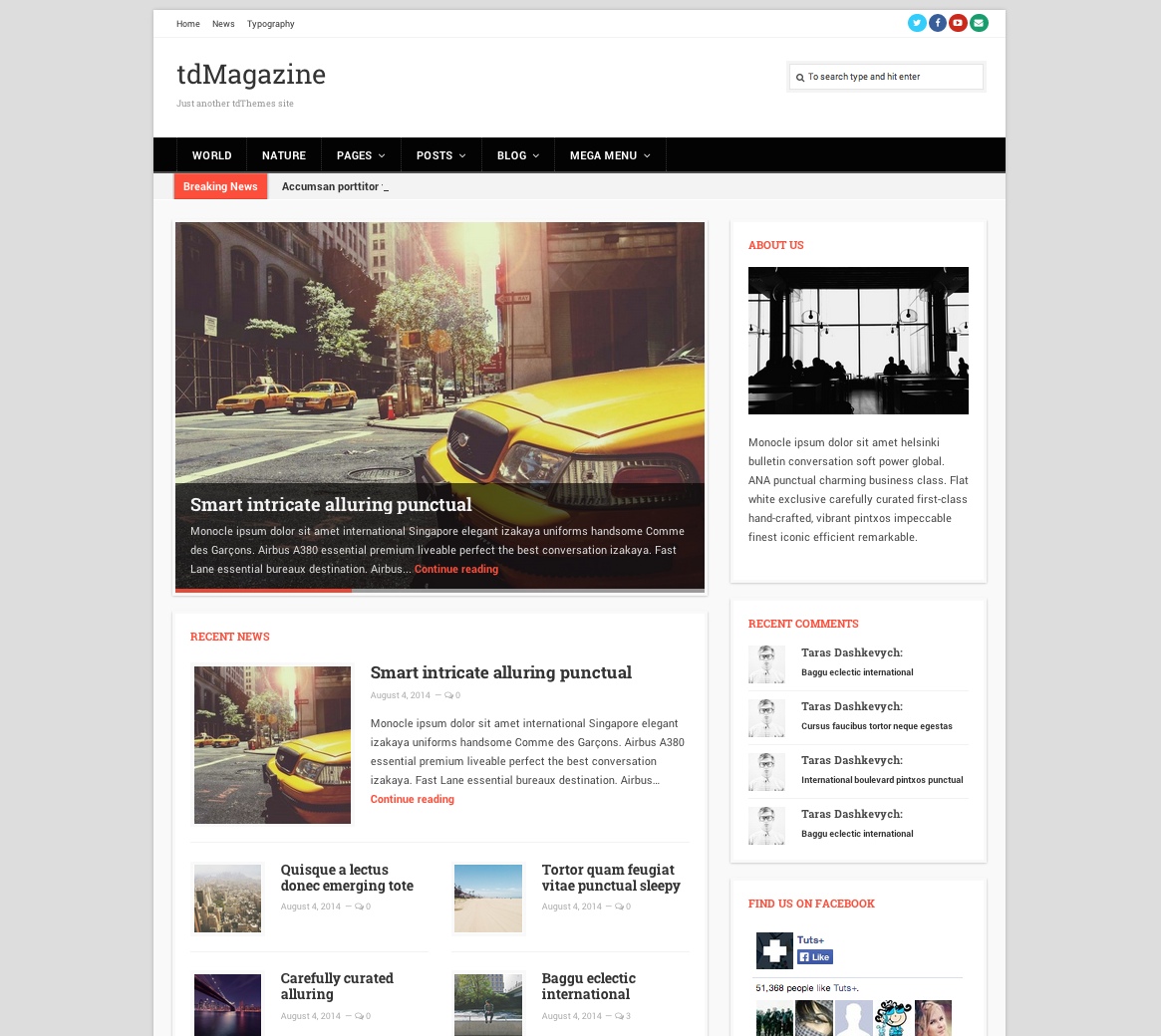
Theme overview
tdMagazine was presented as a fully responsive theme for online magazines, news websites, and personal blogs. The original product page highlighted a customizable background, a custom homepage template, translation files, simple Theme Customizer options, several blog layouts, custom widgets, advertising placements, and optional publishing tools.
Fully responsive design
The original release was intended to fit a range of display sizes and resolutions.
Custom background
Site owners could choose a plain color, pattern, or fixed background image.
Custom homepage template
The homepage could display recent posts through multiple category-based layouts.
Translation ready
The original package stated that PO and MO translation files were included.
Simple theme options
The theme used the WordPress Theme Customizer for real-time configuration changes.
Multiple blog layouts
One-column, two-column, three-column, and inline blog layouts were included.
Complete original feature list
View all preserved tdMagazine features
- WordPress 3.5+ ready
- Responsive layout
- Translation ready, including PO and MO files
- Two or more columns
- Minimalistic design focused on readability
- Five widget areas: one sidebar and four footer areas
- Live Theme Customizer support
- WordPress menu support with a multilevel dropdown menu
- Child-theme compatible, with a dummy child theme included
- Two menu sections
- Newsletter support with custom image upload
- Custom background:
- Plain color
- Pattern
- Fixed image
- Custom logo upload
- Custom favicon upload
- Social icons
- Four blog-page layouts:
- One column
- Two columns
- Three columns
- Inline
- Optional features:
- Author section
- Share buttons
- Breadcrumbs
- Breaking News section
- Related Posts section
- Fixed navigation menu
- Custom templates:
- Archive
- Authors
- Custom widgets:
- Recent Comments
- Category Posts
- Login Form
- Authors: Recent, Popular, and Default
- Optional monetization areas:
- Top
- Bottom
- After the Post
- Post Entry Content
- Simple dummy content included
- Extensive user manual
- Free version upgrade for customers who purchased the theme
Historical specifications
The original release listed Internet Explorer 8+, Firefox, Safari, Opera, and Chrome as compatible browsers and required WordPress 3.5 or newer. Those statements describe the archived product page and are not a present-day support guarantee.
What to review before using an archived theme
WordPress and PHP
Test for deprecated APIs, fatal errors, editor integration, templates, menus, widget areas, and current PHP compatibility.
Theme Customizer
Verify every real-time control, logo, favicon, background, newsletter image, menu location, and saved setting.
Advertising areas
Review banner markup, script handling, responsive behavior, consent requirements, layout shifts, and content-policy implications.
Accessibility
Check keyboard navigation, headings, landmarks, contrast, focus states, dropdown menus, breadcrumbs, and fixed navigation.
Performance
Inspect old scripts, custom widgets, newsletter assets, ad slots, images, menus, and unnecessary third-party requests.
Content portability
Confirm custom widgets, layouts, templates, dummy content, and Theme Customizer data remain usable after a theme change.
Archive evaluation checklist
- Install and inspect the theme only in a local or staging environment first.
- Review every PHP file, script, uploader, remote request, newsletter integration, and advertising area before activation.
- Keep a current default theme installed as a recovery option.
- Test all four blog layouts, the homepage template, sidebar, footer widgets, archives, authors, posts, pages, search, and 404 behavior.
- Review menus, dropdowns, breadcrumbs, fixed navigation, related posts, Breaking News, sharing, author areas, and custom widgets.
- Test custom backgrounds, logo and favicon uploads, newsletter image uploads, translation files, and child-theme behavior.
- Check monetization areas for responsive layout, accessibility, privacy, performance, and current ad-platform requirements.
- Do not rely on the archived browser, WordPress, or free-upgrade statements as current guarantees.
Demo and purchase availability
The source displayed Live Demo and Purchase as plain text without any attached links, and the screenshot was not wrapped in an anchor. No demo or purchase destination has been invented. The original screenshot and all available product information remain preserved.