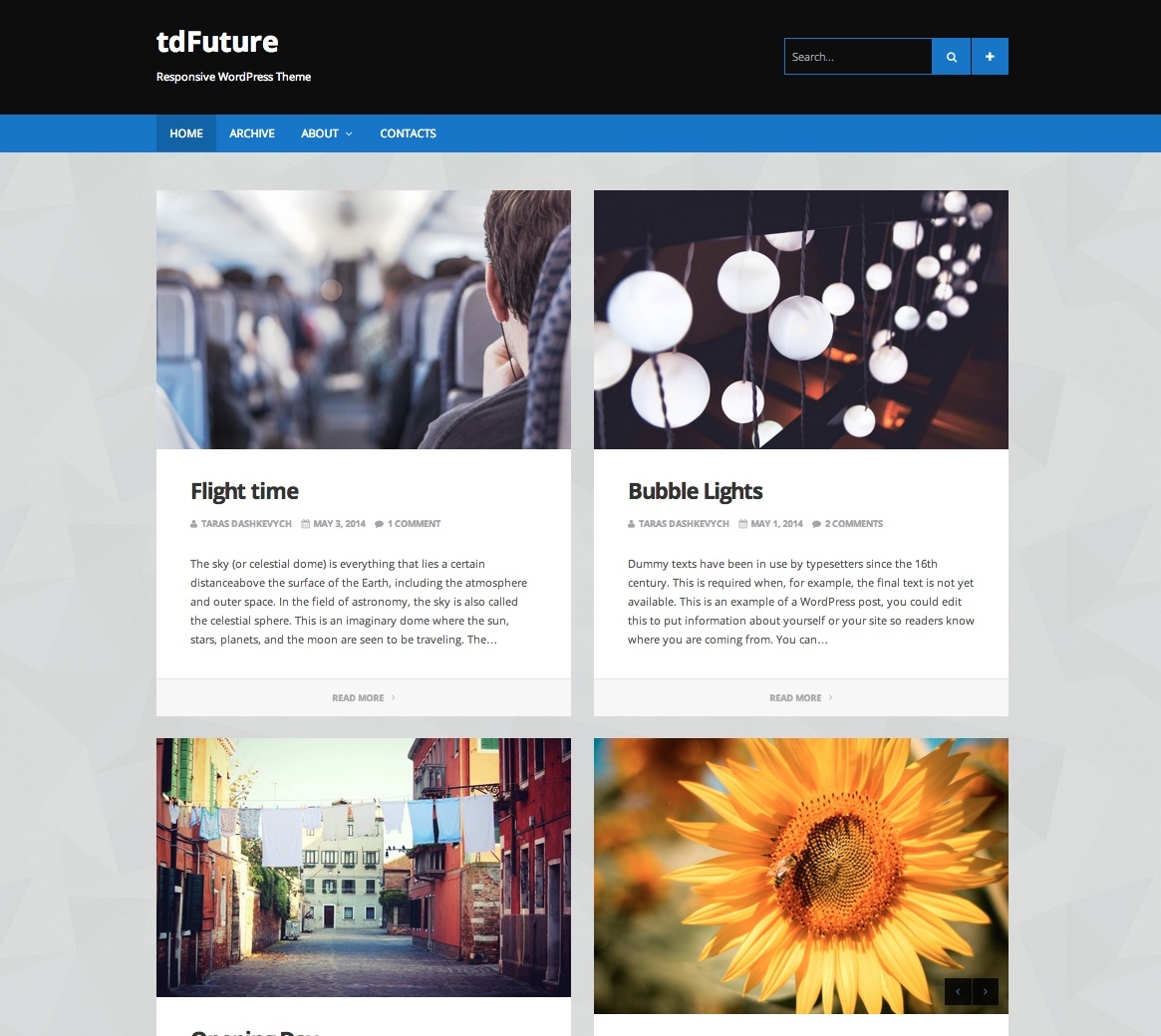
Theme overview
tdFuture was presented as a readability-focused responsive theme for personal blogs and portfolio sites. The original page emphasized support for articles, images, video, audio, galleries, quotes, links, chat posts, multiple blog layouts, custom post backgrounds, translation files, widgets, menus, social icons, and live Theme Customizer previews.
Fully responsive design
The original release was intended to adapt to different screen sizes.
Custom post backgrounds
Individual blog posts could use one of 14 predefined background colors.
Multiple blog layouts
The blog could display one, two, or three posts per row.
Translation ready
The original package stated that PO and MO translation files were included.
Eight post formats
Standard, Audio, Video, Gallery, Image, Quote, Link, and Chat formats were supported.
Theme Customizer support
Settings could be previewed in real time through the WordPress Theme Customizer.
Complete original feature list
View all preserved tdFuture features
- WordPress 3.5+ ready
- Responsive layout
- Translation ready, including PO and MO files
- One or more columns
- Minimalistic design focused on readability
- Eight post formats: Standard, Audio, Video, Gallery, Image, Quote, Link, and Chat
- Fourteen post background colors; the background did not apply to single pages
- Six widget areas: three in the header and three in the footer
- Live Theme Customizer support
- Custom background
- Custom logo upload
- Social icons
- WordPress menu support
- Optional share buttons
- Infinite scroll support that could be turned on or off
- Custom templates: Archive Page and List of Authors
- Image slideshow and audio playlists
- Nine color schemes
- Three blog-page layouts: one, two, or three posts per row
- Extensive user manual
- Free version upgrade for customers who purchased the theme
Historical specifications
The original release listed Internet Explorer 9+, Firefox, Safari, Opera, and Chrome as compatible browsers and required WordPress 3.5 or newer. Those statements describe the archived product page and are not a present-day support guarantee.
What to review before using an archived theme
WordPress and PHP
Test for deprecated APIs, fatal errors, editor integration, template behavior, and current PHP compatibility.
Post formats
Confirm how each format renders in current WordPress and whether modern block content is handled correctly.
Customizer settings
Verify every live-preview control, uploaded logo, background option, color scheme, and saved setting.
Accessibility
Check keyboard navigation, headings, landmarks, contrast, focus states, menus, slideshows, playlists, and infinite scroll.
Performance
Inspect old scripts, icon assets, slideshows, audio players, images, infinite-scroll requests, and unused layout code.
Content portability
Confirm post formats, templates, widgets, background choices, and Theme Customizer data remain usable after a theme change.
Archive evaluation checklist
- Install and inspect the theme only in a local or staging environment first.
- Review every PHP file, script, media player, uploader, remote request, and Customizer control before activation.
- Keep a current default theme installed as a recovery option.
- Test all eight post formats, including missing media, long titles, embeds, galleries, links, and quotes.
- Test one-, two-, and three-column blog layouts at phone, tablet, desktop, zoomed, and wide-screen sizes.
- Review infinite scroll, share buttons, image slideshows, audio playlists, author lists, archives, menus, and widgets.
- Check post background colors, color schemes, custom logo, custom background, and translation files.
- Do not rely on the archived browser, WordPress, or free-upgrade statements as current guarantees.
Demo and purchase availability
The source included a working screenshot/demo destination at /demo_subdomain/tdfuture.html. It also contained a separate Live Demo anchor with an empty href and displayed Purchase without a link. The working demo destination is preserved, while no purchase URL or replacement empty link has been invented.